


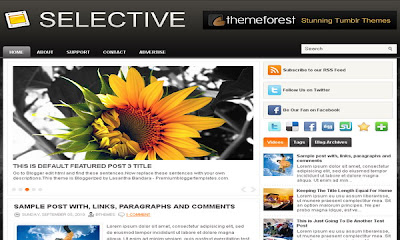
Firecrow Template



Template Author: Avinas Bhardwaj
Descriptions: Firecrow Blogger Template is a free blogger template with 2 columns. Template type : right sidebar, auto readmore, 4 columns footer, magazine, right sidebar, slider menu and more..
Configure Meta tags
Login to your blogger dashboard--> layout- -> Edit HTML.Now Scroll down to where you see below codes :
<meta content='DESCRIPTION HERE' name='description'/>
<meta content='KEYWORDS HERE' name='keywords'/>
Replace DESCRIPTION HERE,KEYWORDS HERE as below.
DESCRIPTION HERE:Write your blog description
KEYWORDS HERE:Write the keywords of your blog separated by comma.
How To Configure Favicon:
Login to your blogger dashboard--> layout- -> Edit HTML.Now Scroll down to where
you see below code :
<link href='YOUR-FAVICON-URL' rel='shortcut icon' type='image/vnd.microsoft.icon'/>Now replace "YOUR-FAVICON-URL" with your Favicon address/url.Configure Featured Content Slider
There is 4 featured slides in this slider.Login to your blogger dashboard--> layout- -> Edit HTML. Find below code.
This is the code for the first slide:
<!-- Featured Slide 1 Code Start -->
<li class='sliderImage'>
<a href='SLIDE-1-LINK-HERE'>
<img class='sidim' src='https://blogger.googleusercontent.com/img/b/R29vZ2xl/AVvXsEg6tt_iZDn4Vg1SLNJBpyzf394PZMAwT14wZYi6wWb_a9y0CjsrHR64VbGNyB6CsIHL4N4WT9sK-fCLDs8zKvgPyKYrS8S6aA88dYIuLJuySnyyNsc1uYbvXT4-tl2xfHP6X2tJrldEYayH/s1600/1.jpg' style='width:670px;height:250px;'/>
</a>
<span class='botom'>
<b>SLIDER-1-TITLE-HERE</b>
<br/> <p>Replace these every slider sentences with your featured post descriptions.Go to Blogger edit html and find these sentences.Now replace these with your own descriptions.This theme is Bloggerized by Lasantha - Premiumbloggertemplates.com [...]</p>
</span>
</li>
<!-- Featured Slide 1 Code End -->- Replace "SLIDE-1-LINK-HERE" with your slide link(where to go when click on this slide/image).
- Replace "https://blogger.googleusercontent.com/img/b/R29vZ2xl/AVvXsEhgOrnHWwCrEDJP_ga-_FzGJkE-Zx3-m8m11s26S70FLFtyNi3vb5keULuM2llqE3Fn51jogZivFHG1x2TQHlCm8-5qY-sLXwf-vrpi3sEo5xYBMf_5Fh4X3P91-p-oRgvz_-arfbmjx1k/s1600/image-1.jpg" with your slide image url.
- Replace "Replace these every slider sentences with your featured post descriptions.Go to Blogger edit html and find these sentences.Now replace these with your own descriptions.This theme is Bloggerized by Lasantha - Premiumbloggertemplates.com [...]" with slide description.
Ok.Now we have configured first slide in the slider.Also you can configure other 3 slides, like this.
How To Configure Second Navigation Menu
Find <div id='foxmenucontainer'> inside your template.(using CTRL+F).This is the beginning of the navigation menu.Now follow the steps given here:
How To Configure a Navigation Menu
How To Add a Header Logo
You can add a header logo for this template easily in the "Page Elements" section(Blogger Default Method).
If you have any problem regrading this template,leave a comment below.
Important !!!:
Please do not remove the footer credit. I spend several hours to create this blogger template. So that you can use it for your blog. All I ask is, stay the credit intact.


